Demo Showcase.
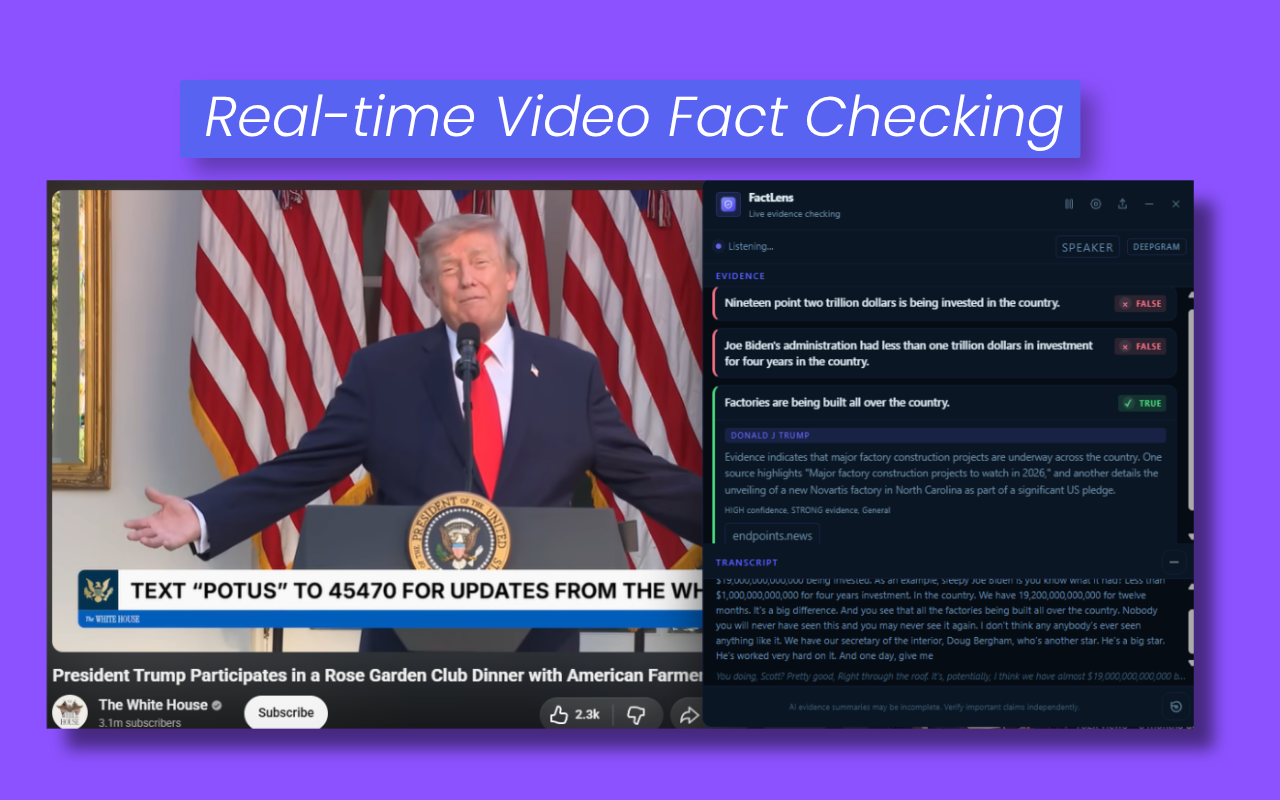

FactLens listens to your browser tab, transcribes what is said, spots checkable claims, and brings back source-backed evidence cards inside a floating panel. No switching tabs. No copy-pasting.
You choose Sources. We provide Evidence.
See FactLens in action with the live demo, or explore the FactLens API for your own apps and workflows.
Build with FactLens in your own apps and workflows. Start with $1,000 in free API usage.
FactLens runs in your browser and only uses external services you choose. Transcription, AI, and Search are configured separately.
Once you press Start, FactLens captures audio from the active tab using the Chrome tab capture API. Nothing is recorded before you press Start or after you press Stop.
For audio and video sessions, FactLens turns speech into text with your selected transcription provider. Deepgram, Gladia, OpenAI STT, and custom transcription endpoints are transcription choices, not AI fact-checking providers.
FactLens separates checkable factual claims from opinions, personal-state statements, and uncheckable assertions. Only externally verifiable claims move to the next step.
When Search is on, FactLens sends a short claim-derived query to your selected search provider and returns source URLs and snippets. Blocked sites are filtered out before evidence is shown, and trusted sites are prioritized.
FactLens sends detected claims, limited context, and retrieved source snippets only to the cloud, self-hosted, or custom AI provider you select.
The result appears in the floating panel as an evidence card with a label, source links, and a short explanation. The overlay stays visible during YouTube fullscreen. You can resize the panel or close it any time.
FactLens does not collapse everything into true or false. Each evidence card is specific about what the sources actually show.
Independent sources directly support the claim as stated.
The core claim holds but a detail is imprecise or missing context.
Technically accurate but framed in a way that creates a false impression.
Retrieved sources directly contradict the claim.
Not enough independent evidence either way at the time of the check.
Subjective or value-based. Not externally checkable. Labelled and left alone.
Someone is doing a bit, playing a persona, or exaggerating for the timeline. FactLens only checks it when there is a concrete claim.
Create your own evidence cards and logic for workflows that need custom verdict rules.
FactLens has three independent tracks: speech-to-text for audio/video, AI for reasoning and vision, and Search for evidence retrieval. You can combine provider-hosted, self-hosted, and custom services for your workflow.
Trial: choose each provider in extension Settings and save its key on that device. FactLens Pro: create a named transcription, AI, or search credential in Console, connect it to the required pipeline stage, then bind the matching key once in the extension. Credential names and routes synchronize; API keys remain encrypted on the device.
Audio/video uses transcription, AI, and optional search. Image/post mode has its own AI and optional image-search routes and never uses a transcription credential.
Used only for audio and video sessions. It converts spoken audio into text for YouTube, podcasts, streams, meetings, lectures, and similar pages. It is not used for image or post scanning.
Controls how FactLens understands claims, classifies verdicts, and summarizes source snippets. For screenshots, memes, charts, and visual claims, choose a vision-capable AI model.
Retrieves live source material for claims. Search can run with AI or without AI. Without Search, FactLens may still detect claims, but it has no live web evidence to ground them.
| Option | Used for | Key needed? | Notes |
|---|---|---|---|
| Deepgram (recommended) | Audio/video transcription | Yes | Fast live transcription. Audio is sent to Deepgram. Not used for image/post scanning. |
| Gladia | Audio/video transcription | Yes | Cloud live transcription. Audio is sent to Gladia. |
| OpenAI STT | Audio/video transcription | Yes | Cloud speech-to-text chunks. Audio is sent to OpenAI. |
| Custom transcription endpoint | Audio/video transcription | Optional | Connect a Whisper-compatible or custom HTTP transcription service that you operate or choose. |
| Option | Used for | Key needed? | Notes |
|---|---|---|---|
| Self-hosted Models | AI reasoning through a service you operate | Depends | Connect Ollama, LM Studio, vLLM, or another compatible model server. Models run in that service, not inside the FactLens extension. |
| Gemini | AI reasoning + vision | Yes | Use a vision-capable Gemini model for image/post scanning. |
| OpenAI | AI reasoning + vision depending on model | Yes | Choose a vision model when scanning images, screenshots, or posts. |
| Anthropic Claude | AI reasoning + vision depending on model | Yes | Choose a vision model when visual context matters. |
| Custom endpoint | AI reasoning, optionally vision | Depends | Ollama, LM Studio, vLLM, RunPod, Modal, your own proxy, or another endpoint you control. Vision depends on the selected model and endpoint. |
| Option | Used for | Key needed? | Notes |
|---|---|---|---|
| Search off | No live evidence retrieval | No | Claims may be detected, but they are not web-grounded. |
| Your Browser | Browser search | No | Easiest evidence retrieval. No search API key required. |
| Serper | Search API | Yes | Consistent API search. |
| Brave Search | Search API | Yes | Independent search API. |
| SerpApi | Search API | Yes | Search API provider. |
| Custom Search | Custom retrieval | Depends | FactLens sends a JSON POST body containing {"q":"query"} and reads a results array with URL, title, and snippet fields. |
Choose how FactLens turns speech into text. This only affects audio/video sessions. Image and post scanning do not use Deepgram or any speech-to-text provider.
Trial users choose Deepgram, Gladia, OpenAI STT, or Custom transcript in Settings > Transcription. Pro users create a transcription credential in Console, connect it to Speech to text in Workspace, then enter its secret locally in Settings > Console sync.
The popup Transcript control shows only compatible transcription choices. Deepgram is not an AI fact-checking provider; it only turns audio into text.
Choose how FactLens reasons about claims. Connect Gemini, OpenAI, Anthropic, a self-hosted model service, or another compatible custom endpoint.
Trial users configure this in Settings > AI provider. Pro users create an AI credential in Console, connect it to the required audio/video or image/post stage, and bind its key locally in the extension.
For a custom provider, enter the HTTP endpoint, exact model identifier, optional key, and test it before starting a session. Image/post mode requires an endpoint and model that accept image content.
Choose where FactLens gets evidence. Search can run with or without AI. Your Browser needs no key; API search providers can be more reliable for consistent retrieval.
Trial users choose Search off, Your Browser, Serper, Brave Search, SerpApi, or Custom Search in Settings > Search engine. Pro users create a search credential in Console and connect it separately to Source retrieval for audio/video and Image search for image/post checks.
Open Source preferences to add trusted sites, prioritized sites, and blocked sites. Use the popup Search dropdown to switch quickly.
Open the popup, choose Check Images and Posts, confirm the image-mode AI and Search choices, then click Scan For Posts/Images. FactLens finds visible items, removes duplicates locally, and lets you review what will be checked.
Image scanning is not an audio workflow. It does not use Deepgram. Use a vision-capable AI model for screenshots, memes, charts, and visual claims. Use Search when you want source-backed evidence.
Multilingual posts/images work best with vision models. Text-heavy images can still work through OCR plus Search, but full visual context requires a vision-capable model.
Use this section for services you operate on localhost, your network, or a private server. FactLens does not include a local model runtime: the service must already be running and reachable from Chrome. Use HTTPS and authentication for any endpoint exposed beyond your own device.
FactLens sends short WebM audio chunks as multipart form data and expects JSON containing transcript text. An OpenAI-compatible service such as Speaches can provide the required /v1/audio/transcriptions endpoint.
Example CPU-only Speaches container:
docker run --rm --detach \
  --publish 8000:8000 \
  --name speaches \
  --volume hf-hub-cache:/home/ubuntu/.cache/huggingface/hub \
  ghcr.io/speaches-ai/speaches:latest-cpu
In Settings > Transcription, choose Custom transcript, set URL to http://localhost:8000/v1/audio/transcriptions, and enter the exact model identifier accepted by the server. Leave the key blank only when the endpoint does not require authentication. Advanced fields let you change multipart field names or the response text path.
The simplest option is an OpenAI-compatible /v1/chat/completions endpoint. FactLens sends a model name, messages, and token limit and reads the assistant message as JSON. Native Ollama /api/chat and /api/generate endpoints are also supported.
Use an instruction-tuned model with enough context for the selected prompt and evidence. For image/post checks, both the server and model must support image content; a text-only model cannot interpret the image itself.
If your server uses a different request or response shape, use the custom body template and response text path in Advanced settings.
Install Ollama using its official instructions, pull an instruction model, and make sure its service is running.
ollama pull <model-name>
ollama serve
Choose Custom AI, set URL to http://localhost:11434/v1/chat/completions, enter the same model name you pulled, leave the key blank for an unprotected local server, and run Test provider. Ollama accepts image input through this endpoint when the selected model supports vision.
Download and load an instruction model in LM Studio, then start its server from the Developer tab. The default OpenAI-compatible chat URL is http://localhost:1234/v1/chat/completions.
Choose Custom AI in FactLens, enter that full URL and the exact loaded model identifier, then run Test provider. LM Studio documents its compatible endpoints in the OpenAI compatibility guide.
For image/post scanning, the loaded model and local server must support image input. Text-only local models can still help with text claims, but they cannot fully understand screenshots, charts, or memes.
vLLM exposes an OpenAI-compatible server for supported chat models. Start it with a model that includes a chat template and protect remote deployments with an API key.
vllm serve <model-name> --port 8000 --api-key <private-key>In FactLens, set URL to http://localhost:8000/v1/chat/completions, use the same model name, enter the configured key, and run Test provider. See the vLLM serving guide for supported APIs and chat-template requirements.
Search is separate from the AI provider. Use Your Browser for no-key search, or configure a provider under Settings > Search engine.
A custom endpoint receives POST {"q":"claim-derived query"} and should return {"results":[{"url":"https://...","title":"...","snippet":"..."}]}. Use HTTPS and authentication for remote endpoints.
Use Search when you want source-backed evidence. Use Search in English when the source content is in a language with fewer fact-checking results; FactLens translates the search query before retrieving evidence.
FactLens separates secrets kept on your device, account preferences synchronized through FactLens, and content processed by the providers you choose.
API keys are stored in protected extension storage and are sent only to the provider or custom endpoint they authenticate. FactLens Cloud synchronizes credential names and routing—not the secret values.
Audio is sent to the transcription service you select. Claims, relevant context, and source excerpts may be sent to your selected AI service. Chosen images or posts may be sent to the configured vision-capable model.
When Search is enabled, claim-derived queries are sent to the search method you select. Preferred domains are prioritized when relevant, while blocked domains are excluded from FactLens retrieval and evidence selection.
Signed-in accounts can synchronize profile details, appearance, credential names, routing, prompts, verdict presentation, source preferences, devices, and session history needed for Console features. Provider keys are excluded.
Synchronized sessions can include transcripts, prompts, provider responses, sources, claims, and verdicts so activity and speaker history remain useful across devices. Pro users can stop future complete-session uploads from Data controls.
Clear History removes local session history. Console supports export, retention settings, stopping future Pro uploads, and clearing synchronized history without removing workflows or account configuration. Signing out removes the local account session, and uninstalling removes extension-managed storage through Chrome.
This planned improvement focuses on speech-heavy media where music and background audio make reliable transcription harder.
Improve speech detection in soundtrack-heavy videos, intros, edits, clips, livestreams, and commentary formats. The goal is to reduce noise from music and background audio so FactLens focuses on spoken claims.
Published with each customer’s permission. Reviews focus on claim quality and real verification work.
Try every FactLens Pro feature free for 7 days, then choose monthly or annual billing.
Prices are in USD. Paid plans renew automatically until canceled and may exclude applicable tax.